All your Shield essentials
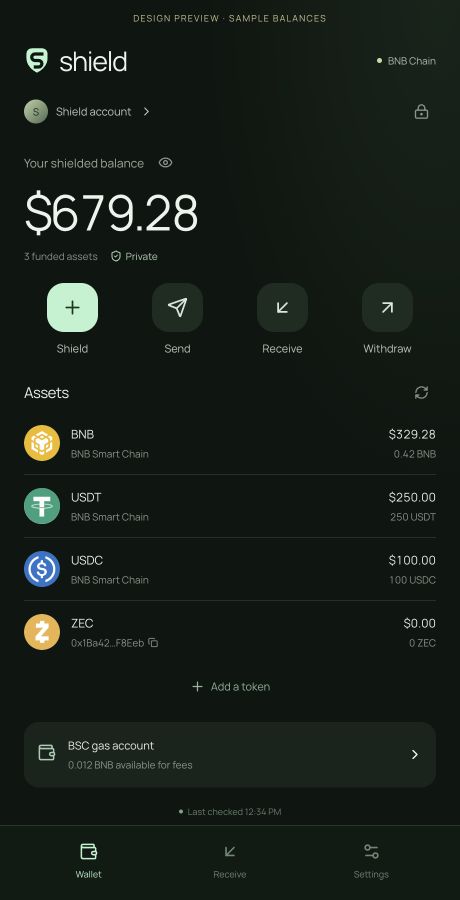
Create or restore your account, shield listed BSC tokens, send privately and withdraw. Send BNB and BEP-20 tokens from your public account too.
 shield
Shield, send, receive and withdraw, with your keys on your device. Choose the Chrome extension or the separate installable wallet app.
Manual ZIP installation · Store review pending
Open & install the wallet appThe app has its own icon and window, with no ZIP or developer settings. It does not add a browser-toolbar extension.
Download the wallet and its installation guide here. The extension opens from Chrome's toolbar and keeps its own local wallet storage.
Chrome Web Store review is pending. Add to Chrome will be available after approval. You can install the extension ZIP manually in the meantime.
For desktop Chrome, Brave and Edge. Extract the ZIP, enable Developer mode, then load the extracted folder. Follow the four steps below or the README.
Download the extension ZIP above, then extract it into a permanent folder on your computer. Keep that folder after installing.
Paste chrome://extensions into Chrome's address bar. On that page, turn on Developer mode.
chrome://extensionsChoose Load unpacked and select the extracted folder that contains manifest.json. Check that the extension name is Shield Wallet.
Pin Shield Wallet from your browser's extensions menu, then click its icon. Create an account or restore your existing Shield phrase or encrypted backup. Save your recovery phrase offline before adding funds.
Use a desktop browser. In Brave or Edge, use brave://extensions or edge://extensions for step 2. Firefox, Safari and mobile extension installs are not supported.
Finish pending transactions and export an encrypted backup before switching between the extension, wallet app or main website. They have separate local storage. A recovery phrase or encrypted backup does not transfer signed pending-transaction records.
To update the manual extension, lock it, replace the contents of its existing installation folder with the new release, then click Reload on the Extensions page. Do not uninstall it or remove its local data.
Switching between store and manual builds, or upgrading from extension 0.1.0, may change the extension ID. Restore your backup if the new copy has separate storage. Keep the original until you confirm recovery, and keep your recovery phrase offline.
Create or restore your account, shield listed BSC tokens, send privately and withdraw. Send BNB and BEP-20 tokens from your public account too.
Password-encrypted local storage, recovery phrase backup and a lock when you close the wallet.
Install Shield from your browser, then reopen it from your device's app launcher. Keep your wallet close with an app icon.
Open the wallet app, choose Install app and confirm in Chrome. This option has its own app icon and window; it does not install the toolbar extension.
Go to wallet.tryshield.me. Let the first app download finish, then choose Open Shield Wallet.
Use the Install app button above the wallet. If Chrome does not show its prompt, use the install icon in the address bar or follow the browser-menu instructions shown in Shield.
Confirm the browser's installation dialog. Open Shield from your device's app launcher for its own wallet window. You can also keep using it in a browser tab.
Read the data disclosure, then create an account or restore your Shield recovery phrase or encrypted backup. Save your recovery phrase offline before adding funds.
Install options depend on your browser and device. The wallet provides instructions when a direct install prompt is unavailable.
Your wallet keeps your public gas account separate from your private Shield account.
shd1…Share this address for private transfers within Shield. It is not an exchange deposit address and cannot receive ordinary BSC transfers.
0x…Use this address for exchange withdrawals and ordinary BSC transfers. Fund it with BNB for gas, then choose Shield to move supported tokens into your shielded balance. You can also send BNB or BEP-20 tokens back out of this public account.
The BSC account and its transactions are public. This release pays gas from that account and does not use a relayer, so onchain observers can link gas payments to your activity.
No. It is an installable web app with an app icon and its own window. It does not appear in Chrome's extensions menu or add a wallet button to the browser toolbar. Other websites cannot connect to it as an injected wallet provider. Open Shield itself to use your account.
For the browser toolbar, use the separate Chrome extension download and installation guide above.
Yes. At wallet.tryshield.me, import your existing 24-word Shield recovery phrase or encrypted Shield backup. The same phrase restores the same Shield account and derives the same public BSC account used by Shield Wallet.
The app, extension and main website have separate local storage. Finish pending transactions in the original wallet before moving. A recovery phrase or encrypted backup does not transfer its signed pending-transaction record. Keep the original wallet until you confirm recovery. Never send a recovery phrase to support or enter it in a download form.
The app checks for updates from its HTTPS host. An update waits until all windows using the older wallet are closed; it does not refresh an unlocked wallet to apply an update. Keep your recovery phrase or an encrypted backup before clearing browser data or removing app data.
Installing the app continues to trust wallet.tryshield.me for future updates. It has not undergone Chrome Web Store review, and installation does not protect against a compromised hosting account or browser.
After its first verified download, the cached wallet interface can open offline while the browser retains its app files. Current balances, blockchain checks, price updates and sending transactions require a network connection. Keep a recovery backup: browsers can remove site data, and the app cache is not an account backup.
Your encrypted vault and wallet records stay in this wallet's browser storage. The app connects to its configured BSC RPC and public price service; those providers receive relevant requests and your IP address. Its service worker caches app files, not RPC responses, passwords or account records. It has no page-reading content scripts, injected wallet provider, analytics or arbitrary signing interface. Read the wallet privacy policy for details.
The wallet has internal security reviews and automated checks. It has not had an independent third-party audit or antivirus certification. The installable app has not had browser-extension-store review. File verification helps detect corrupted or mismatched app assets; it cannot guarantee software is free of malware or vulnerabilities.
The protocol's trusted setup also has unresolved verification limits. Read the Shield documentation and risks before using it with funds, and keep your recovery phrase offline.
Your account, ready from your own app icon.